
Search Janesville Police Blotter
Janesville police blotter searches usually start with the city police department, then move to Rock County if the call became a case or a later court file. That is the cleanest way to keep a report, a self-initiated incident, and a body-cam record in the right order. Janesville is the largest city in Rock County, so the records trail can run across more than one office fast. If you need a report or a release copy, start with the office that handled the event and keep the request narrow enough to return the right file.
Janesville Police Blotter Overview
Janesville Police Blotter Sources
The Janesville Police Department is the first stop for city incidents. The department is at 100 N. Jackson St., Janesville, WI 53547, and the records bureau can be reached at 608-755-3100. The city uses an online self-initiated incident report form at cms.ci.janesville.wi.us/iframe_apps/incidentreportform.aspx, which is helpful when the event can be handled through a report instead of a long paper trail. That page is the city-side anchor for a Janesville Police Blotter search.
Rock County matters too. The sheriff is at 100 S. Main St., Janesville, WI 53545, and the sheriff site at co.rock.wi.us/sheriff is the county route when the incident sits outside city limits or grows into a county file. The city and county share the same river valley, but they do not hold the same record. That split matters when you are trying to match a blotter line to a later report or a court date.
The incident form below is the best visual source for the Janesville request path.
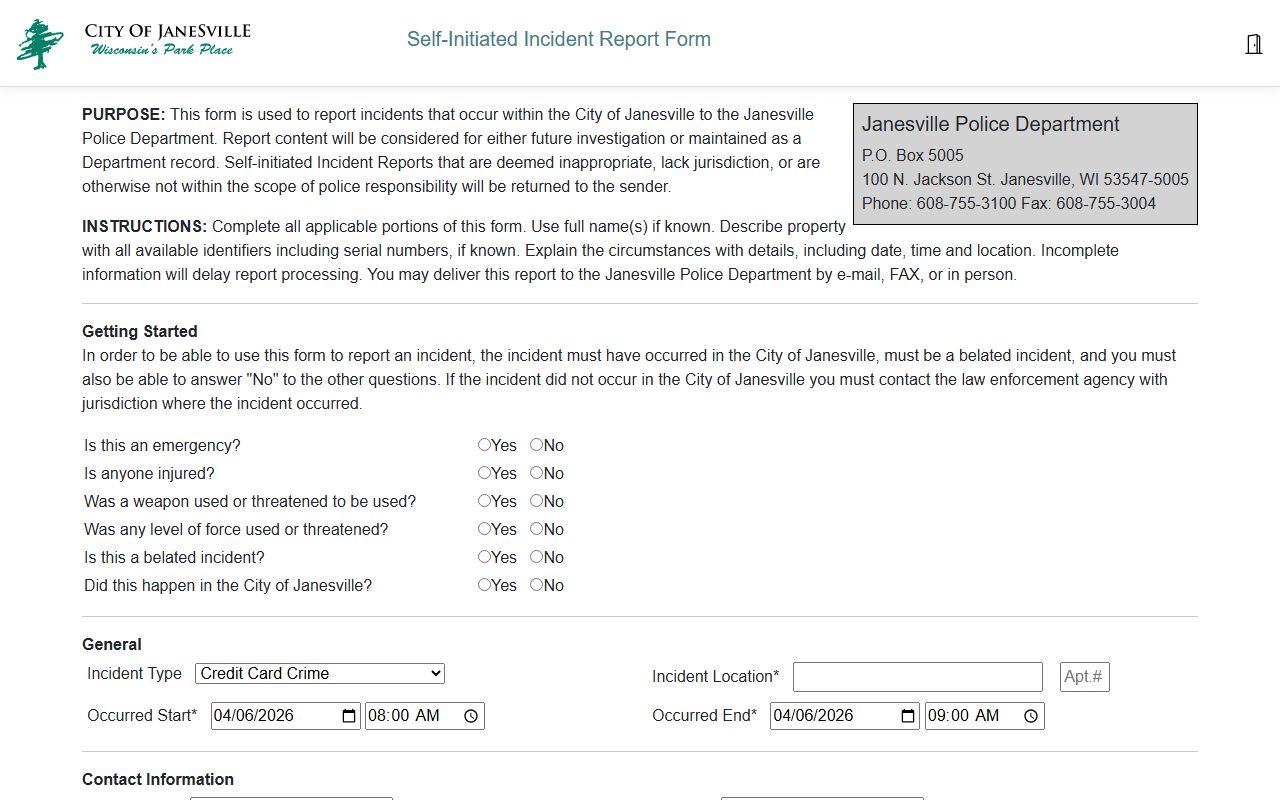
It matches the city's request flow and keeps the search on the official police path.
Janesville also uses a records bureau schedule that matters for timing. The bureau is open Monday through Thursday from 8:00 a.m. to 4:30 p.m. and Fridays from 8:00 a.m. to 12:00 p.m. Checks can be mailed to P.O. Box 5005, Janesville, WI 53547-5005, and email delivery is preferred when the city sends documents back. Those details help you plan the request before you submit it.
Janesville Police Blotter Requests
Janesville police blotter requests work best when they are specific. Use the date, the place, the name if you know it, and the record type you want. The city says email delivery is preferred and that requests are handled through an online public records portal. That helps when you are asking for a report, a release copy, or a body-cam file that can be delivered without a trip to the desk. The more exact the request, the faster the records staff can get to it.
The city also lists payment options. Checks can be mailed to 100 N. Jackson St., or you can pay by cash, check, or credit at the records desk during business hours. That gives you some flexibility, but the real time saver is still a narrow request. A broad request can slow down the review and can make the redaction work larger than it needs to be.
If you want a simple city-side request path, the incident report form at cms.ci.janesville.wi.us/iframe_apps/incidentreportform.aspx is the place to start. It is not a substitute for every file, but it gives the city enough detail to find the report you actually want. That is the practical difference between a quick ask and a vague one.
Janesville also has an extended video redaction process. The research notes say video redaction fees are applied under Wis. Stat. 19.35(3)(h), and prepayment is required for requests that need that work. Payment is due within 30 days of invoice or the request closes. That means a body-cam request needs more planning than a simple incident copy.
The request process is easier when you keep the office and the record type together. That is the main lesson of a Janesville Police Blotter search. Use the police desk for the report, the county for the case, and the records bureau for the release.
Note: Janesville video requests can take longer because redaction work is billed and reviewed before release.
Janesville Police Blotter and Courts
Once a Janesville police blotter entry becomes a case, WCCA is the next place to look. Wisconsin Circuit Court Access at wcca.wicourts.gov can show the docket trail after the police report is done. That is important in Rock County because the police file and the court file are not the same thing. The court file tells you what happened after the arrest, citation, or charge was filed.
The Wisconsin Court System at wicourts.gov gives the broader path for forms and self-help material. If the record is a crash, the state crash portal at app.wi.gov/crashreports is the better route after you have the report number. That keeps the search from bouncing between offices that do not hold the same record type.
For criminal history questions, the DOJ record check system at recordcheck.doj.wi.gov is separate from the city report path. It is useful when you need a state history check instead of a release copy. The two tools serve different jobs, and keeping them apart makes the search cleaner.
The older Wisconsin access case at law.justia.com/cases/wisconsin/supreme-court/1979/76-724-7.html is useful background. It helps explain why daily arrest lists and blotter-style material have long been treated as public in Wisconsin. That history still matters when you ask for a small file tied to a real incident.
Janesville Public Records Limits
Wisconsin public records law starts with access. Wis. Stat. Chapter 19 covers the access rule, the fee rule, the limits, and the enforcement path through sections 19.31, 19.35, 19.36, and 19.37. In plain terms, Janesville can release a police blotter record, but it can still redact juvenile details, sensitive victim information, or active investigation material when the law requires it. That is normal. It does not mean the record is gone.
The Department of Justice Office of Open Government at doj.state.wi.us/office-open-government and its resource page at doj.state.wi.us/office-open-government/office-open-government-resources explain how custodians and requesters should handle access and redaction. That is useful when a report is delayed or when the city releases part of a file but not everything. The point is to keep the request narrow enough that the bureau can answer it cleanly.
The rules around video matter again here. A Janesville request that includes bodycam footage can take longer because the city has to review and redact before release. If you only need the incident report, ask for the report first. If you later need the video, ask for that separately. That split usually works better.
Search Janesville Police Blotter
Start with the city police department if the incident happened inside Janesville. Move to Rock County if the case moved into the court system. Use the crash portal for traffic files. That sequence keeps the search steady and keeps you from asking one office for a record that lives in another one.
When you need the fastest result, pair the incident form, the records bureau, and WCCA together. If the first request is thin, go back with a narrower date range or a better location clue. A clean Janesville police blotter search is usually built on a good place, a good date, and the right office from the start.